
Discover how SAP Incentive Management automates commission calculations, manages incentive plans, tracks sales performance and improves payout accuracy.
Sales commission calculation becomes very challenging as companies grow in terms of their sales force and develop various sales incentives. The basis of commission may be related to revenue, number of products sold, profits, number of customers acquired, or individual performance. Manual computation of commissions becomes very prone to inaccuracies, delays, and disputes with employees.
SAP Incentive Management assists companies to streamline this challenging task through automated computation of commissions based on sales transactions and pre-set calculation procedures. Knowing how this works enables companies to have more accurate commissions paid and better sales performance.
SAP Incentive Management is an advanced solution for managing the sales performance and compensation of an organisation. This software helps the company design, manage, calculate and track the sales incentive programs.
There is no need to use spreadsheets or calculate manually when it comes to processing the sales data based on the compensation policy of the company. The system can also help salespeople and managers get more insight into the commissions, goals and payment.
The system allows using different types of compensation such as fixed commission, incentive percentage, tiers, bonuses, and other payment types.
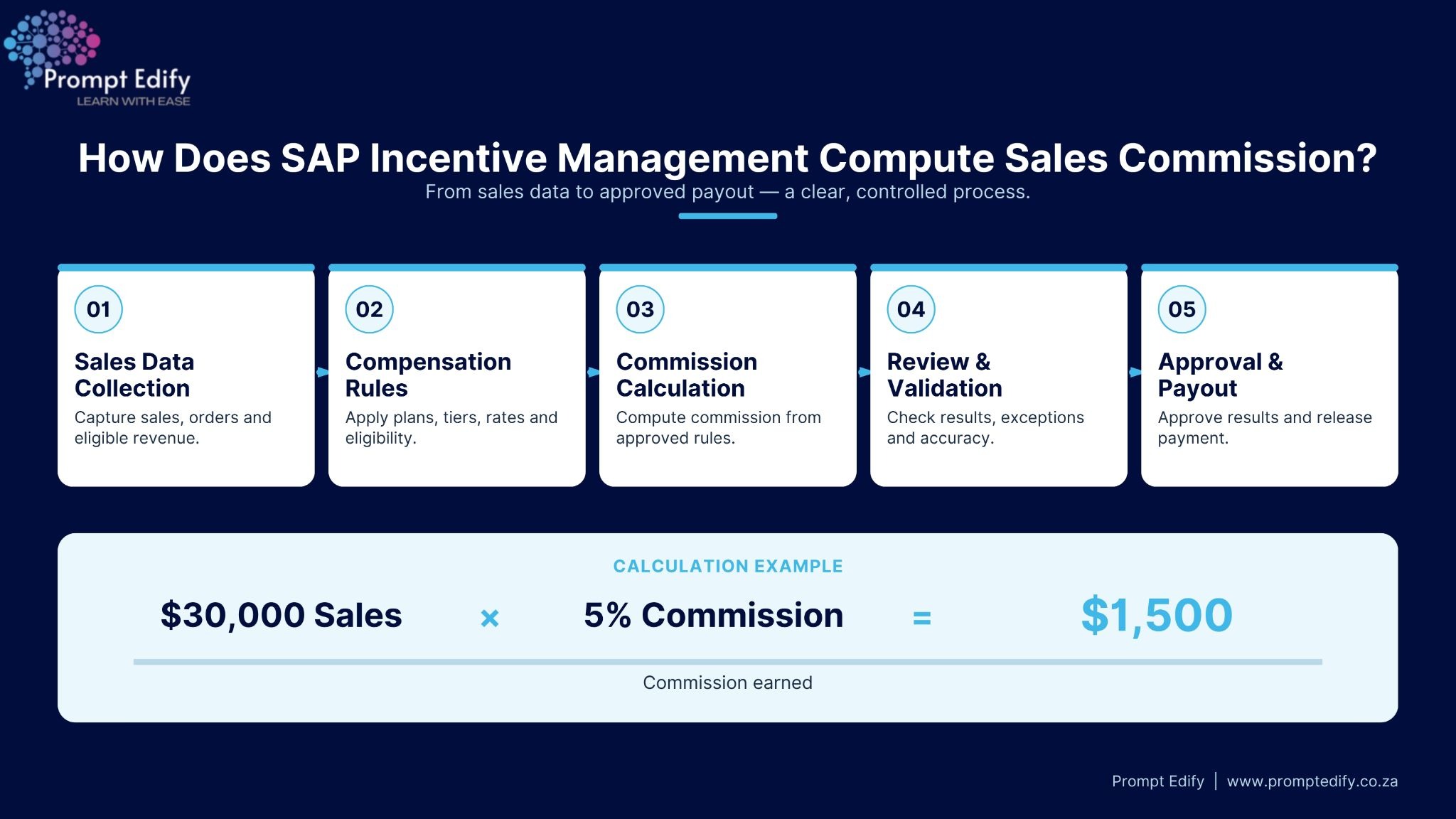
SAP commission calculation includes several consecutive steps. All these steps ensure the correct recording of sales transactions, application of the compensation rules and payment validation.
The first step in the SAP commission calculation process is the collection of sales transaction data. It is important to pay special attention to the accuracy of the data as it will be used further in calculating commissions.
SAP Incentive Management can operate with the data from such business applications as CRM, ERP, billing and others.
The data include:
For example, when the sales representative makes a sale for the sum of $20,000, the data about the transaction will be imported to the commission management software and will be used in calculating the commissions.
It is important to collect correct transaction records in order to avoid miscalculations in commissions.
After the transactional data are collected, the system applies the compensation rules that have been set by the organisation.
Compensation rules define the level of commission that employees earn as well as the conditions for receiving payments.
Organisations may formulate various incentive schemes considering the job position, sales target, geographical location, products and objectives of the business.
Examples of such schemes include:
For instance, an organisation can give a 5% commission on the eligible sales up to $50,000 and a higher commission rate after meeting the target.
After transaction data and incentive plan rules have been provided, the calculation module starts working with this information.
At this point, there is a link made between individual sales activity and incentive plans. The calculation module takes into account all the eligible transactions, the commission rates, performance targets and calculates the commission amount for each individual sales representative.
Incentive payout calculations can also take into account cancellation amounts, return amounts, commission splits, joint accounts, and other compensation elements.
For instance, if one of the sales representatives earns $30,000 worth of eligible sales and the commission rate is 5%, then the commission amount will be $1,500.
This task is greatly simplified in organizations with thousands of transactions and many incentive plans.
When the computations are completed, managers and compensation administrators analyze the computations before releasing the payments.
This is useful for firms to find out any errors, strange amounts of commissions, no information, or any discrepancy between the sales transactions and compensation policy.
The following are some important reviews that can be done:
This last step entails verification of the computed commissions and generating payments.
After the approval process is completed, the computed commissions can then be presented to the payroll/financial systems for payment processing depending on how the company has integrated its approval processes.
Management can make use of commission reports to gauge the effectiveness of incentives in driving business results.
Among the sales commission management solutions which provide many benefits there is SAP Incentive Management:
With incentive management from SAP, the entire process of commission calculation becomes simple by combining transactions, compensations, automatic calculation and payments in one seamless stream. It helps organisations improve the process of calculation, maintain transparency in compensations and manage incentives efficiently as their sales operations increase.
Those who are interested in studying compensation and sales commission, studying about the tool will be beneficial for them.
Prompt Edify offers you the chance to undergo SAP training to learn more about enterprise application and business processes. Learn more about SAP Incentive Management course.
By Team Prompt Edify
Have any enquiry? Call us
+(27) 740294414
(+91) 99932-86938
wecare@promptedify.com


Prompt Edify Africa (PTY) Limited
2nd Floor, Rivonia VillageCnr Mutual Road and Rivonia Boulevard Rivonia Village, 2191
Johannesburg , South Africa
Contact : +27740294414
Prompt Edify East Africa Limited
KN 78 ST, Kagarama, Kigali, Kigali, Nyarugenge, Umujyi wa Kigali, Rwanda
Contact : +250 727 845 771
Prompt Edify Private Limited
4th Floor #15, City Vista Tower, Fountain Road,
Kharadi, Pune(MH), India.
PIN- 411014
Contact : (+91) 99932 86938



Contact Us Today!
+27740294414 | (+91) 99932 86938 | +250 727 845 771
contact@promptedify.com | wecare@promptedify.com
🌐 https://promptedify.co.za/