
Learn how the SAP order-to-cash process connects sales orders, inventory, delivery, billing and payments to improve accuracy and streamline business operations.

All companies strive to get customers' orders, ship products on time and receive payment for them without any delays. But the process of handling all those operations becomes rather difficult when sales, inventories, warehouses and finance departments have separate systems and problems with information, inaccurate invoices, late shipping and payment processing occur.
That is why the SAP order-to-cash process is critical in such cases. It involves all phases of the sales cycle in one integrated system and allows the company to handle customer orders, shipments, billing and payments.
For people who start working with SAP, the order-to-cash process becomes an easy and helpful tool to understand how SAP modules interact in practice.
The order-to-cash process in SAP or O2C and OTC is the entire process of business operations from the point where customers place orders to the point where the company gets paid for them.
The SAP order-to-cash process is handled by mainly the SAP SD module, while the other modules include SAP MM and SAP FI.
The main aim of the order-to-cash process is to ensure a seamless flow of information within the organization. This means that in case there is a purchase of goods by the customers, the sales team is able to know whether they are available and arrange for delivery and generation of invoices among other activities related to payment.
Knowing what happens at each step will make it easier to understand how SAP helps in the entire sales process.
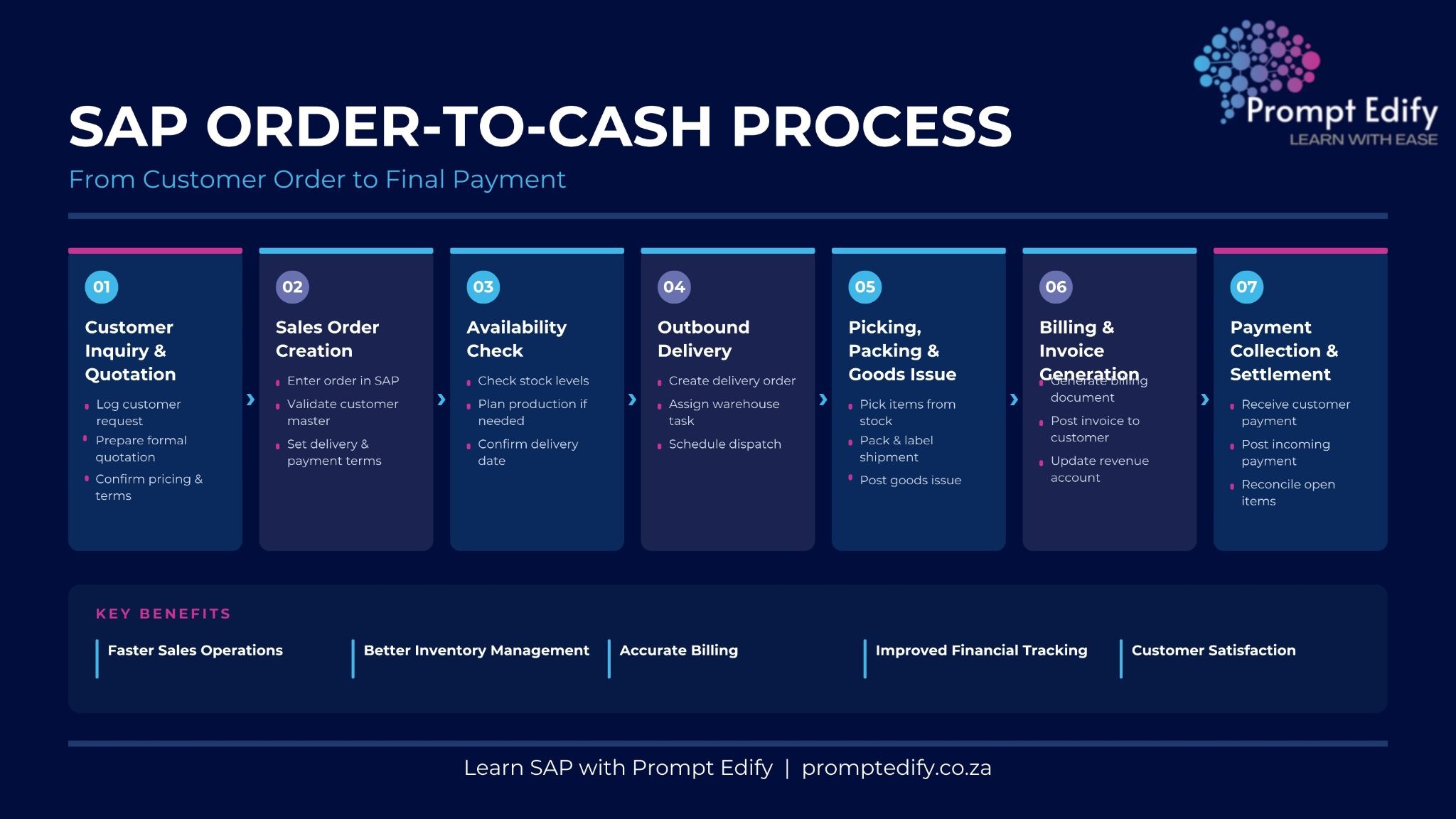
The inquiry process could start with a customer approaching the firm with a request to ask about the product, availability, and pricing.
The sales department can enter the inquiry process on SAP and quote the client according to the needs. The quote includes vital information like the description of the goods, quantity, pricing, validity date, and relevant conditions.
Once the quotation is accepted by the client or when the purchase order is confirmed, then the sales order is created by the sales department in SAP.
The sales order contains the following information in it:
Customer information and address
Material/product information
Quantity
Price/discount
Delivery date
Payment and delivery terms and conditions
All the master data and configurations that are relevant will be used by SAP to capture all the information.
The third step involves the system checking if the desired product is available after the creation of the sales order.
The process is usually facilitated through the Available-to-Promise (ATP) feature. It makes it possible to find out whether the needed quantity of the product can be delivered on time depending on the existing inventory.
In case the products are not available, it is necessary to organize their replenishment or set another delivery date.
After making preparations to deliver the orders, the logistics department generates the outbound delivery documents through SAP.
These documents contain information that is necessary in preparing and delivering the orders. The staff within the warehouse are able to use the document in performing tasks such as picking and packing.
In some instances, based on the organizational structure of the company, the activities within the warehouse could be linked with SAP EWM (Extended Warehouse Management).
Before the dispatch of the orders, the warehouse staff will perform picking and packing of the orders.
Post Goods Issue (PGI) will be done in the company using SAP after the orders have been dispatched.
This is a critical process since it updates the inventory and the accounting postings are triggered.
After completing the delivery, the invoice document is generated in SAP.
Invoice document consists of all data about products like their quantity, prices, taxes, and many other pieces of information. The SAP system creates an invoice document in accordance with each case - whether from the sales order or delivery documents.
The creation of the invoice document causes the posting of accounting data into the SAP FI system. The customer's account is updated.
The last stage is collecting payments from the customers.
The finance department enters all payments collected to the SAP system on the customers' invoices. After matching the payment, the invoice is settled.
In case of partially settled invoices and the balance left, SAP helps the finance department to monitor it.
Implementation of an efficient order-to-cash process has many advantages for firms.
Transparency: The process allows firms to track orders, deliveries, invoices and payments.
Manual effort saved: Due to integrated data there is not much manual entry required.
Effective inventory management: Inventory checking helps firms manage their deliveries effectively.
Correct billing: Efficient flow of documents reduces errors in billing.
Efficient finance process: SAP FI integration allows effective updating of accounts.
Better customer service: Coordination will help firms serve their customers better.
SAP order to cash process is a key business process that links customer orders to delivery, invoicing and payment. Through this process, SAP assists companies to coordinate and keep proper records as well as manage their sales processes efficiently.
Beginners and working professionals can benefit immensely from acquiring knowledge about the above process in relation to gaining a firm grasp on SAP SD process and other business modules.
Prompt Edify offers industry-specific training for SAP to assist students and working professionals to understand various SAP modules and business processes. Learners can get functional knowledge with SAP consultants and trainers at Prompt Edify and explore career options in the SAP industry.
Learn SAP through Prompt Edify Programs today!
By Team Prompt Edify
Have any enquiry? Call us
+(27) 740294414
(+91) 99932-86938
wecare@promptedify.com


Prompt Edify Africa (PTY) Limited
2nd Floor, Rivonia VillageCnr Mutual Road and Rivonia Boulevard Rivonia Village, 2191
Johannesburg , South Africa
Contact : +27740294414
Prompt Edify East Africa Limited
KN 78 ST, Kagarama, Kigali, Kigali, Nyarugenge, Umujyi wa Kigali, Rwanda
Contact : +250 727 845 771
Prompt Edify Private Limited
4th Floor #15, City Vista Tower, Fountain Road,
Kharadi, Pune(MH), India.
PIN- 411014
Contact : (+91) 99932 86938



Contact Us Today!
+27740294414 | (+91) 99932 86938 | +250 727 845 771
contact@promptedify.com | wecare@promptedify.com
🌐 https://promptedify.co.za/