
Learn how SAP QM Integration connects MM, PP, and SD to manage inspections, improve production quality, support traceability, and strengthen business processes.

Quality management practices are a key component of any organization that makes, buys, or delivers a product. Companies require dependable procedures in place to make sure materials meet quality requirements, production processes are followed, and end products meet customer requirements.
SAP Quality Management (QM) allows companies to control these activities by using a structured inspection process, quality notifications and quality reporting. But quality management by itself cannot exist. It integrates with other SAP modules in order to monitor quality from the supplier to the customer.
SAP QM Integration with MM, PP, SD QM integrates with all the other modules that will impact quality management. When you integrate the SD, which is Sales and Distribution, PP is Production Planning, and MM is Materials Management.
The guide will look at how SAP QM works with these three vital SAP modules, the main SAP QM integration points, and the advantages businesses can gain.
SAP QM with SAP modules helps you accomplish quality activities throughout the whole enterprise.
Instead of performing inspections as a discrete operation, organizations can combine the quality processes along with the buying of items, viewing inventory, manufacturing, and sales.
The integration benefits organisations:
A company achieves the integration with SAP QM of MM, PP and SD.
SAP Materials Management (MM) oversees purchasing, goods receipt, inventory, and material movements. When integrated with SAP QM, the module can help companies inspect incoming materials prior to allowing them to be put to free use.
1. Goods receipt quality inspection
After the materials are received from a vendor, a goods receipt process may initiate a quality inspection depending on the inspection type and material profile settings in the system.
2. Quality Inspection Stock
The items to be checked can be made at quality inspection stock. Hence, such items cannot be kept as free-use stock for the time until the inspection is completed.
3. Inspection Results
The inspector will take measurements and record observations against the inspection characteristics. These results are then can be used to compare the product against the requirements.
4. Usage Decision
Subsequent to the reviews, an approved user chooses the use. The materials are either welcomed or declined and performed by the stock-posting choices you may have formulated.
5. Vendor Quality
Quality notifications and inspection results help identify trends and patterns of recurring vendor quality problems.
Example: You are a manufacturing company and receive raw materials from a vendor. An incoming SAP QM inspection is triggered, and your quality team can review the material specifications. You can place approved materials into unrestricted stock, and you can process rejected materials via your designated rejection or return procedures.
SAP facilitates production order processing and shop floor activities. SAP QM Integration with production planning allows manufactures to safeguard quality of product during the production process.
1. In-Process Quality Inspection
Quality checks can occur during production in order to validate that the production process is adhering to set quality standards.
2. Production Order link
The inspection schedule can be associated with a production order which enables the quality team to track the inspection work related to the shop operations.
3. Inspection Characteristics
Inspection attributes are determined by organizations for assessing the measurements, weight, temperature, performance, and other quality factors of products.
4. Defect Recording
When a product or the production process does not conform to the required specification, a defect can be logged.
5. Final Inspection
Once manufacturing is done, it is possible to examine the product to check if it is capable of quality standards before reaching the subsequent business operation.
Example: A producer of car parts The producer's quality control inspectors check other aspects or measurements during the production of the automotive components. As soon as a fault is recognized, the problem is noted and measures are taken before the product is released.
SAP Sales and Distribution (SD) is responsible for receiving customer orders, delivering and billing them. SAP QM integration with SD performs quality inspection for the products before delivery to customers.
1. Delivery-Related Quality Inspection
Inspection is also initiated for delivery activities, depending on configuration and business needs.
2. Outgoing Quality Inspection
You can see the completed product upon export to determine if products can be exported as per specifications.
3. Customer Quality Concerns
In response to customer complaints about product defects, quality notifications provide a way to record issues, analyze problems and implement corrective actions.
4. Product Traceability
They assist in recording inspection data and ensure product quality.
5. Customer Satisfaction
Handling complaints can facilitate the resolution of quality issues before products are shipped and bolster confidence in the product.
An organization gets an end customer order for finished goods. The company carries out the customer order evaluation to check against the necessary specifications prior to shipping. End goods that meet the specifications will then travel through the delivery process.
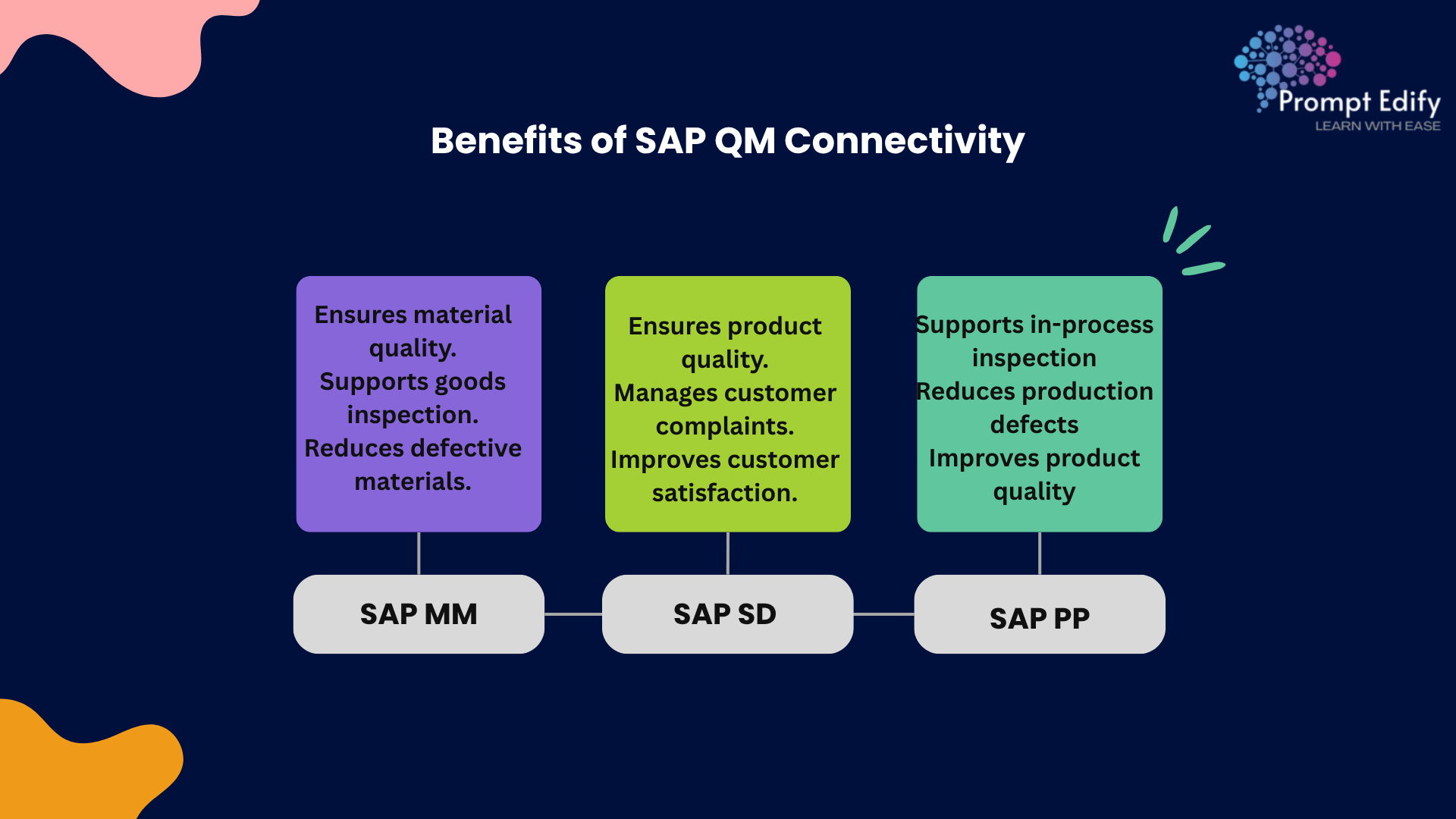
Advantages of SAP MM Integration with PP, MM, SD The quality assurance process gets the following advantages when SAP MM is integrated with SAP QM:
Processes connected are vital for the companies, to control quality of the performed activity.
When the activity is separated into pieces (acquisition, manufacturing and sale quality management), the information is more exposed to error and missing.
SAP QM integration will allow quality management in a relaxed style, connect inspection and business process.
For example, if an adverse raw material was supplied then buying and quality teams can use the same inspection information. A production team can detect a manufacturing defect and a sales team can use the quality process to clear the customer complaint.
By combining these processes, a business is able to operate more efficiently, ensure consistent product quality, and make smarter quality-related decisions.
SAP QM with MM integration SAP QM with MM integration supports various incoming and final inspection processes like inventory, purchase orders, purchase requisitions, evaluation, inspection, etc. SAP QM with PP integration SAP QM integrated with SAP PP will control and inform about the various quality aspects during manufacturing. SAP QM with SD integration SAP QM integration supports delivery, and sales and distribution (SD) processes related to quality.
These integrations can be beneficial to consultants who want to learn about SAP QM. Knowledge about important processes, inspection concepts, and real business cases can be a good start for learners working with SAP QM today.
Ready to enhance your expertise in SAP Quality Management? Contact Prompt Edify today to explore our SAP QM training programs, gain expert guidance on SAP QM integration with SAP MM, PP, and SD, and take the next step toward building a successful career as an SAP professional.
By Team Prompt Edify
Have any enquiry? Call us
+(27) 740294414
(+91) 99932-86938
wecare@promptedify.com


Prompt Edify Africa (PTY) Limited
2nd Floor, Rivonia VillageCnr Mutual Road and Rivonia Boulevard Rivonia Village, 2191
Johannesburg , South Africa
Contact : +27740294414
Prompt Edify East Africa Limited
KN 78 ST, Kagarama, Kigali, Kigali, Nyarugenge, Umujyi wa Kigali, Rwanda
Contact : +250 727 845 771
Prompt Edify Private Limited
4th Floor #15, City Vista Tower, Fountain Road,
Kharadi, Pune(MH), India.
PIN- 411014
Contact : (+91) 99932 86938



Contact Us Today!
+27740294414 | (+91) 99932 86938 | +250 727 845 771
contact@promptedify.com | wecare@promptedify.com
🌐 https://promptedify.co.za/