
Explore SAP sales order processing, its key steps, benefits and workflow, from customer order creation to delivery, billing and final payment in SAP S/4HANA.
Order processing is very important when it comes to managing the business efficiently. From ordering right up to the delivery and billing of the order, proper coordination should be there during the entire process of order processing. Businesses that use manual order processing or have a different system for every process are going to face problems related to delays in processing, wrong pricing, bad inventory management, and wrong billing.
With SAP, it is easy for businesses to manage the whole process of order in one integrated system which comprises all sales and order processing activities. SAP S/4HANA offers a perfect solution for automated order processing for businesses.
The SAP sales order processing is defined as the process of handling the orders of the customers using SAP software program from the time of order creation to its delivery, billing and payment. The process is essential in the Sales and Distribution (SAP SD).
Sales persons can input customer requirements, check the product availability, calculate the price, determine delivery time, and generate invoice using this process. As different organizational processes are integrated in this process, the information that is entered in the system when placing an order is available to other departments without entering again.
For example, if a customer wishes to purchase 100 units of a product, the SAP system will check the product availability, calculate the total price of the order, determine the delivery time, and allow generation of deliveries and billing documents.
Knowing every step enables the organizations to process their customer orders effectively and accurately.
This step starts with creation of sales orders in SAP. It is done using the customer's requests in which customer details, material and quantities are included.
SAP S/4HANA sales orders may be created either through relevant Fiori application or through SAP transactions depending on system configuration.
The system utilizes the master data for customer and material to auto-enter the necessary data.
After entering the necessary data concerning the order, the SAP system verifies the master data.
This includes verification of customer data, shipping, payment conditions, material description and sales area among others. The other customer data and business rules are also verified.
Master data verification is extremely vital since incorrect data might affect pricing and invoicing among other processes.
After entering all the details of the order into the system, SAP calculates the prices applicable for each of the items using the pricing conditions.
In addition, the system also carries out an availability check in order to determine whether the required quantity is available for delivery by the specified date.
In the event that the required quantity is not available in stock, SAP suggests an alternative date of delivery.
After the analysis of order details, prices and product availability, it becomes possible to confirm the sales order and make it saved.
This makes possible creation of a sales order number generated by SAP which allows tracking the whole process of the transaction completion.
After the confirmation of the order it will serve as a basis for further steps like delivery, picking and goods issue.
After the preparation of the order for its delivery, it becomes necessary to create an outbound delivery document.
The document contains information about the product, for instance quantity of product, delivery location and delivery date.
Thanks to the document, employees of the warehouse get ready to send the ordered product. SAP also offers picking and packing features which help companies to manage the warehousing processes more effectively.
Goods picking involves the preparation of the shipment for distribution purposes.
The shipment is packed after which it is posted to SAP by the company.
Posting of goods allows SAP to know about the transaction through the posting of the movement of the goods.
In case the system is configured to do so, an accounting entry is automatically created.
Once the goods issue is done, the next step is billing.
Generation of the billing document takes place in SAP, either from the sales order or from the outbound delivery depending on the process followed.
Billing document entails information such as the item details, quantity, price, taxes, and payment terms.
The billing document is linked to financial accounting as well.
Finally, the customer makes payment of the invoice.
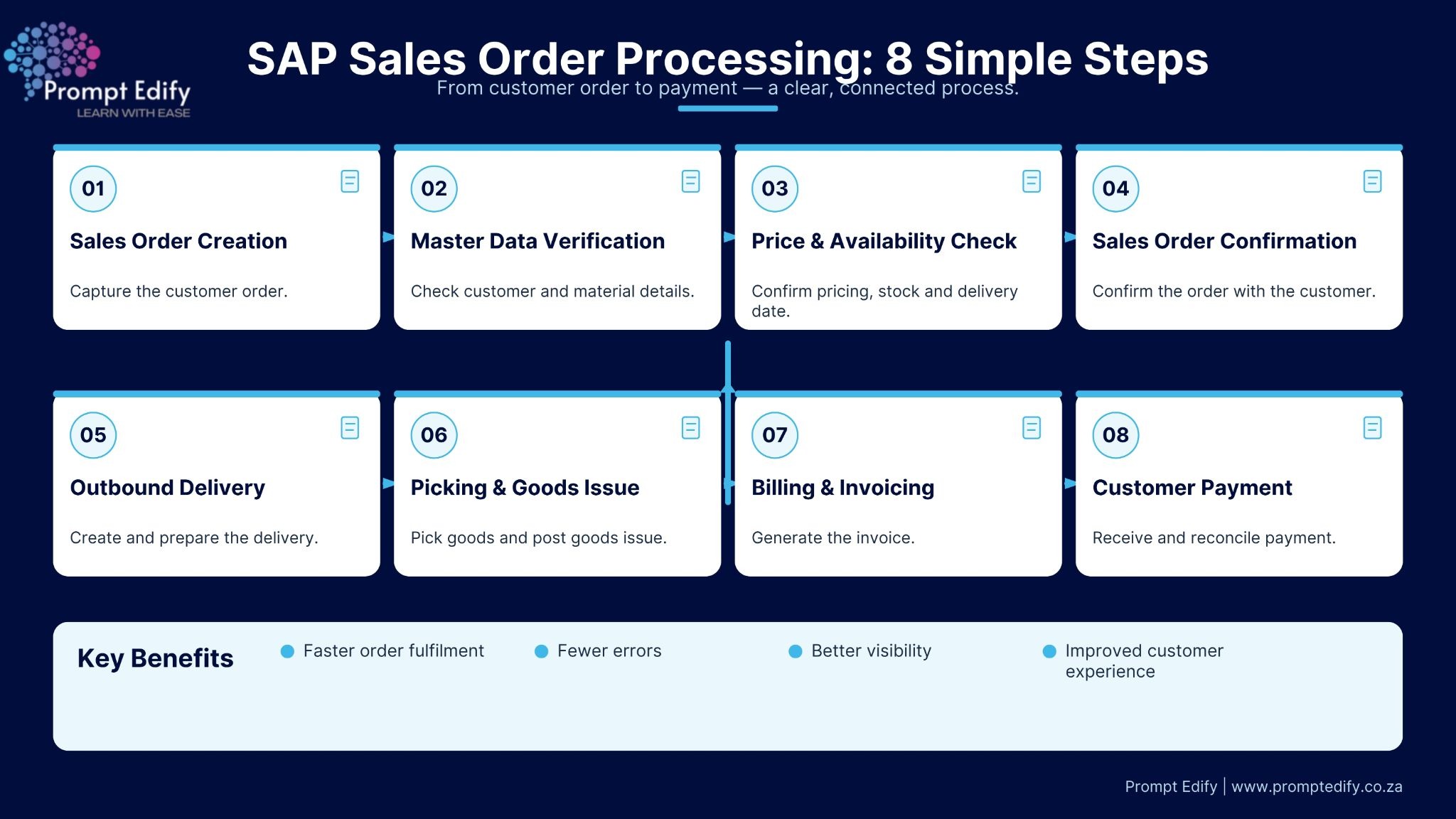
With the help of SAP sales order processing, organizations can create a well-structured process to handle their customer orders from the stage of order creation to the stage of order payment. SAP connects sales, warehousing, inventory, and finance processes for improved efficiency of the sales process management.
The knowledge of the entire sales order process will be useful for those professionals who want to gain SAP knowledge and skills.
Do you want to improve your career by taking up SAP Sales & Distribution? Then here we go with Prompt Edify offering you an opportunity to take SAP training designed especially for the purpose of understanding business processes and learning SAP. Learn more about SAP training from Prompt Edify.
By Team Prompt Edify
Have any enquiry? Call us
+(27) 740294414
(+91) 99932-86938
wecare@promptedify.com


Prompt Edify Africa (PTY) Limited
2nd Floor, Rivonia VillageCnr Mutual Road and Rivonia Boulevard Rivonia Village, 2191
Johannesburg , South Africa
Contact : +27740294414
Prompt Edify East Africa Limited
KN 78 ST, Kagarama, Kigali, Kigali, Nyarugenge, Umujyi wa Kigali, Rwanda
Contact : +250 727 845 771
Prompt Edify Private Limited
4th Floor #15, City Vista Tower, Fountain Road,
Kharadi, Pune(MH), India.
PIN- 411014
Contact : (+91) 99932 86938



Contact Us Today!
+27740294414 | (+91) 99932 86938 | +250 727 845 771
contact@promptedify.com | wecare@promptedify.com
🌐 https://promptedify.co.za/