
SAP Ariba Guided Buying helps employees select approved catalogs, follow purchasing policies and use preferred suppliers and channels for compliant procurement.

Procurement of goods and services is a routine process in every organization. For carrying out the organizational operations, the employees require goods, supplies, equipment and various professional services. In case the employees procure the goods and services without considering the preferred suppliers and organizational purchasing policies, the organizations will end up facing additional costs and other challenges.
Manual management of the above mentioned process can be very confusing for the procurement department because of several reasons like difficulty to find the correct item, difficulty to understand the procurement policy, and difficulty to find the supplier of the procurement goods or services.
SAP Ariba Guided Buying can be helpful in this situation. Let's understand SAP Ariba Guided Buying and its key features.
SAP Ariba Guided Buying is a procurement solution which facilitates employee purchases of their required products and services through a simple digital procurement process. This procurement tool guides the user in the purchase of goods and services from a list of approved procurement sources and according to the organisation’s procurement policies.
Employees do not need to browse through the supplier websites or communicate with procurement departments separately in order to procure anything.
This procurement solution assists the organisation to manage the purchase processes of its employees by guiding them to the preferred supplier, catalogues and procurement channels.
The main aim of this procurement solution is to facilitate the purchasing process of employees.
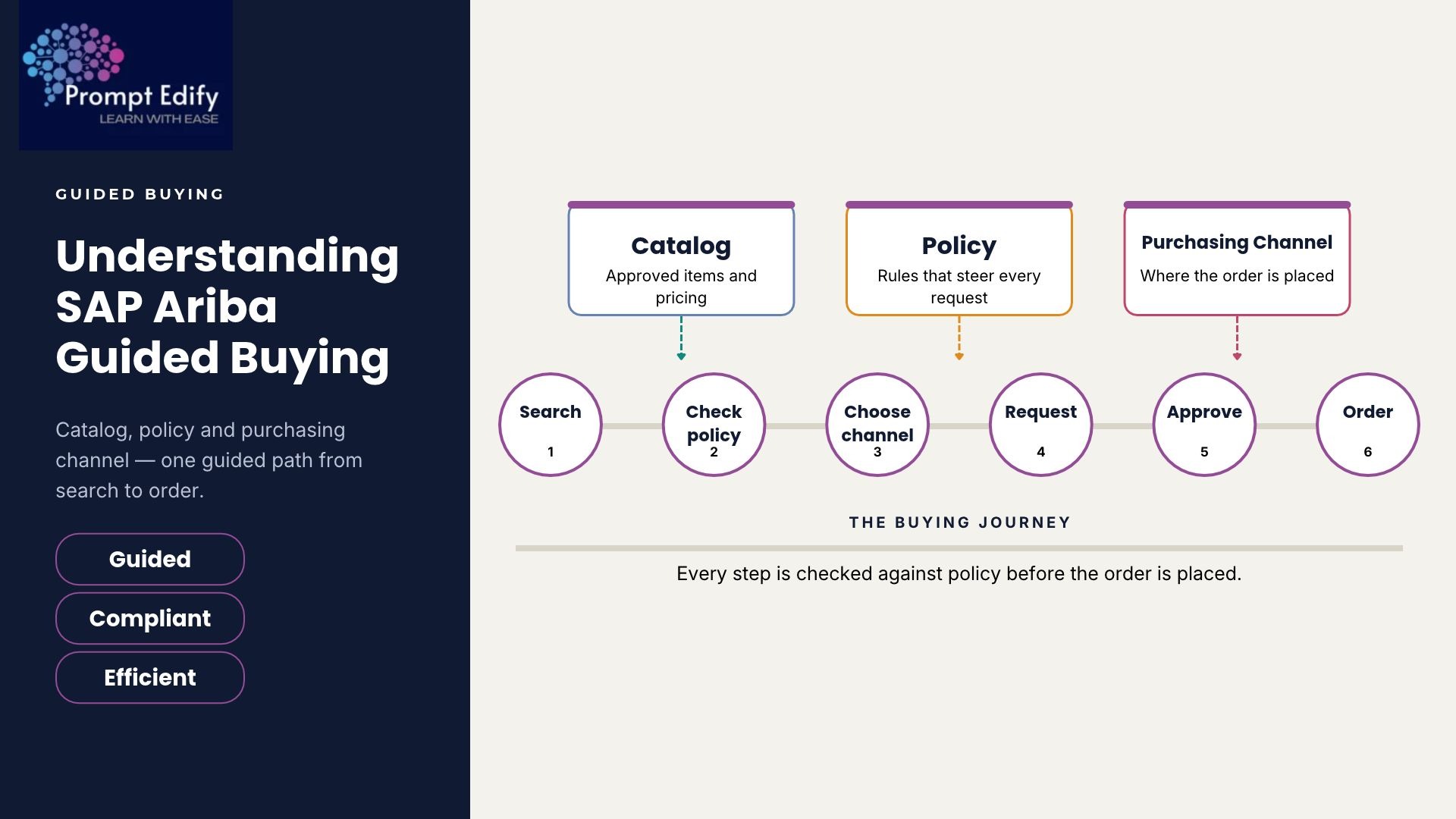
Another important feature of SAP Ariba Guided Buying is that of a simplified process of purchase. Employees are able to search products and services, evaluate their availability and choose products that suit their needs.
Through guided buying, people are able to know the ways through which they need to purchase different products. This makes the routine purchase process very easy and convenient.
Another crucial aspect of guided purchase is that of catalogues. Companies are able to provide catalogues of products that have been approved by the suppliers to employees who are supposed to evaluate products, compare their availability and choose relevant products.
These catalogues may contain:
Organizations may have multiple suppliers and multiple purchasing channels. Nonetheless, employees need to be aware of which purchasing channels should be utilized for what type of purchase.
SAP Ariba Guided Buying will guide employees to authorized suppliers and purchasing channels depending on the organization’s configuration settings. Authorized purchasing channels can include hosted catalogs, supplier catalogs, punchout catalogs and others.
For instance, an employee who is making a purchase of office supplies will be guided to the authorized supplier catalog and not choose an unauthorized supplier on their own.
All organisations have policies that govern the process of requesting for and purchasing goods or services by the employees.
The SAP Ariba Guided Buying facilitates compliance with the purchasing policies through the use of pre-configured purchasing policies and guided purchasing capabilities.
These help in setting up certain requirements, such as preferred suppliers, categories, approvals, and budgets for making purchases.
Once an employee selects the desired goods or services, he/she can go ahead to make the purchase requisitions.
This involves sending the purchasing requisition requests via the configured approval workflows based on organizational guidelines.
Before the request is taken forward to the next procurement phase, the managers/authorised approvers check the purchasing requirements.
Guided Buying Workflow in SAP Ariba
The traditional guided buying workflow involves the following series of actions:
Action 1: Identification of Need for Purchase: The needs for purchasing goods or services are identified by employees in their departments.
Action 2: Search for Products: The user searches for appropriate products/services in the guided buying window.
Action 3: Identification of Authorized Catalog: The employee searches the catalog and selects the authorized products.
Action 4: Compliance with Procurement Policies: The employees are instructed to comply with procurement policies.
Action 5: Creating a Purchase Requisition: The selected products/services are added to purchase requisitions.
Action 6: Completion of Approval Process: The created requisition is submitted for the approval process in SAP Ariba.
The series of actions to be performed and procurement channels to be used depend upon the configuration of SAP Ariba.
There may be a number of benefits that a business would gain by implementing guided buying:
The SAP Ariba Guided Buying allows the company to make procurement easier and at the same time stay in control of procurement policies and spendings. The catalog-based procurement, approved vendor routes and guided buying process will allow finding required goods and making purchases in the set way.
The knowledge of the tool will be beneficial for procurement specialists who want to know how digital procurement systems work and how they help in business nowadays. This knowledge will also give information on how guided buying works within the whole SAP Ariba procurement environment.
Prompt Edify delivers industry-oriented SAP training courses for professionals who want to know enterprise solutions and their business application. Learn more about digital procurement and purchasing with the SAP Ariba Buying Training. Also visit our SAP Ariba Buying & Invoicing Training.
By Team Prompt Edify
Have any enquiry? Call us
+(27) 740294414
(+91) 99932-86938
wecare@promptedify.com


Prompt Edify Africa (PTY) Limited
2nd Floor, Rivonia VillageCnr Mutual Road and Rivonia Boulevard Rivonia Village, 2191
Johannesburg , South Africa
Contact : +27740294414
Prompt Edify East Africa Limited
KN 78 ST, Kagarama, Kigali, Kigali, Nyarugenge, Umujyi wa Kigali, Rwanda
Contact : +250 727 845 771
Prompt Edify Private Limited
4th Floor #15, City Vista Tower, Fountain Road,
Kharadi, Pune(MH), India.
PIN- 411014
Contact : (+91) 99932 86938



Contact Us Today!
+27740294414 | (+91) 99932 86938 | +250 727 845 771
contact@promptedify.com | wecare@promptedify.com
🌐 https://promptedify.co.za/